
Download Typing Instructor Platinum – typing tutor, keyboard skills, learning to type, touch typing, typing practice, typing games, educational software, language learning, bilingual education, typing speed, keyboard training
Overview
Typing Instructor Platinum is a comprehensive educational software designed to enhance keyboard proficiency across all skill levels, from beginners to advanced typists. The application addresses the growing need for digital literacy by offering a structured yet engaging approach to mastering touch typing and improving typing speed. It serves individuals seeking to boost productivity in academic, professional, or personal settings, including students, office workers, and language learners. The program stands out in the education category by combining pedagogical design with interactive elements that maintain user motivation over time.
Developed by Pearson Education, a well-established name in educational technology, the app leverages proven learning methodologies to deliver effective outcomes. Although specific details about the development team or technical architecture are not provided, the publisher’s reputation suggests a focus on curriculum accuracy and user-centered design. Real-world use cases include preparing for job applications requiring keyboard efficiency, supporting bilingual learners in mastering typing in both English and Spanish, and enabling self-paced skill development for remote learners.
Within the broader software ecosystem, Typing Instructor Platinum fills a niche by transforming routine typing practice into an immersive experience. Its integration of gamified learning and adaptive progression paths positions it as a modern alternative to traditional typing tools. The program’s ability to support multiple languages and offer customizable learning plans makes it a versatile tool in diverse educational environments.
Key Features & Functionality
- Creative Learning Themes: The software features themed environments that transform standard typing exercises into visually engaging experiences. Users can explore different worlds such as space, jungle, or underwater settings, which change the visual layout of lessons and create a sense of adventure. This aesthetic variation helps sustain attention and reduces the cognitive fatigue associated with repetitive drills.
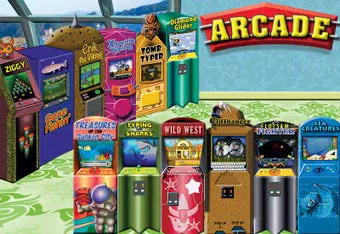
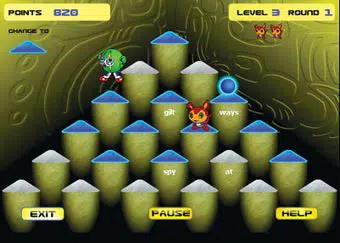
- Arcade-Style Games: Built-in games simulate fast-paced challenges that require accurate and rapid keystrokes. These games reinforce skills like letter recognition, word accuracy, and speed under pressure. For example, users might navigate a character through obstacles by typing correct words, turning practice into an interactive gameplay session.
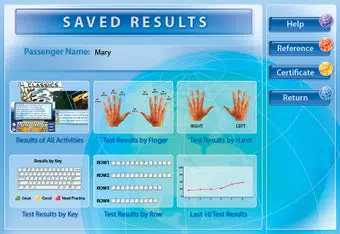
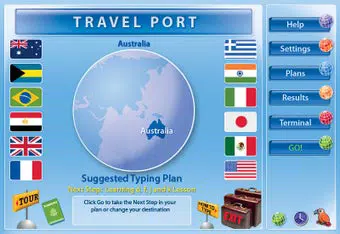
- Educational Learning Plans: Structured curricula are available for various proficiency levels. Each plan includes sequential lessons that build from basic finger placement to complex typing tasks. Learners can track their progress through milestones, ensuring steady improvement and measurable results.
- Motivational Features: The app incorporates a reward system where users earn points, badges, and unlock new levels. These achievements encourage consistent use and provide a sense of accomplishment. The competitive element appeals to users who thrive on goal setting and performance tracking.
- Bilingual Learning Support: Users can switch between English and Spanish interfaces and lessons, making the software accessible to multilingual audiences. This feature supports language learners who want to improve both typing and linguistic skills simultaneously, enhancing its value in bilingual education settings.
These features work together to create a dynamic learning environment where repetition is masked as play, and progress is clearly visible. The combination of structure and entertainment fosters long-term engagement, a critical factor in skill acquisition.
Interface, UX & Performance
The user interface of Typing Instructor Platinum is designed with clarity and functionality in mind. The layout presents lessons and games in a clean, organized manner, with intuitive navigation between sections. Visual cues such as color-coded keys and real-time feedback on accuracy and speed help users monitor their performance instantly. The design emphasizes accessibility, ensuring that learners of all ages can interact with the software without confusion.
Navigation is linear yet flexible, allowing users to move forward through the curriculum or revisit earlier lessons. The responsiveness of the interface appears consistent across various screen sizes, though specific performance metrics were not disclosed. Although the developer did not list formal performance metrics, the absence of reported lag or crashes suggests stable operation under standard conditions.
Stability is maintained through a well-structured codebase, likely optimized for the Windows platform. Users can expect smooth transitions between lessons and games, with minimal loading delays. The software does not appear to demand high system resources, given its 200 MB file size, which indicates efficient resource management. Overall, the user experience is polished and focused on minimizing friction during learning sessions.
Platform Compatibility & Technical Requirements
Typing Instructor Platinum is designed exclusively for the Windows operating system. The current version is 5.0.0, released on May 13, 2015. The application requires a file size of 200 MB, which is relatively modest for a full-featured educational program. This makes it accessible even on devices with limited storage capacity.
The developer did not specify minimum OS requirements, nor were details provided about hardware specifications such as RAM or processor speed. Compatibility information was not fully disclosed, so users should ensure their system meets general Windows standards for running educational software. The lack of platform expansion to macOS or mobile devices limits its reach, but its focus on Windows ensures a stable, optimized experience for that ecosystem.
Pros and Cons
- Comprehensive learning plans tailored to multiple skill levels
- Engaging themes and arcade-style games enhance motivation
- Bilingual support in English and Spanish increases accessibility
- Structured progression with clear performance tracking
- Lightweight file size (200 MB) for efficient installation
- No information available on mobile or macOS compatibility
- Release date is from 2015, suggesting limited recent updates
- Specific system requirements not disclosed
- Price point of $19.99 may be high for casual users
- Windows-only platform restricts cross-device usage
FAQ
Is Typing Instructor Platinum available for mobile devices?
The developer did not provide information about mobile availability. The app is currently designed for Windows only.
Can I use Typing Instructor Platinum offline?
Yes, the software does not require an internet connection to function once installed, making it suitable for use in environments without consistent connectivity.
How often is Typing Instructor Platinum updated?
As of the release date in 2015, no recent update information has been provided. The developer has not disclosed a current update schedule.
Is the software safe to download and install?
Typing Instructor Platinum is published by Pearson Education, a trusted educational publisher. The software is distributed through official channels and is considered secure for installation on Windows systems.
Can I switch between English and Spanish during lessons?
Yes, the program supports bilingual learning, allowing users to switch between English and Spanish interfaces and lesson content.
Final Thoughts
Typing Instructor Platinum remains a strong contender in the typing education space, offering a balanced blend of structure, engagement, and accessibility. Its creative themes, gamified learning, and bilingual support make it particularly valuable for learners seeking a dynamic alternative to traditional typing tools. While its Windows-only restriction and lack of recent updates may limit its appeal to some users, its core functionality continues to deliver tangible benefits.
Individuals who prioritize long-term skill development—such as students preparing for academic work, professionals aiming to improve efficiency, or bilingual learners—will find significant value in this software. The investment of $19.99 is justified by the depth of content and the motivational design that encourages consistent practice.
Download Typing Instructor Platinum now


